

Full Stack DR for OKE: Complete Guide to Backup, Image Replication, and Disaster Recovery

I’m Pratik Borkar, a Technical Architecture specializing in Oracle Cloud Infrastructure (OCI) and Kubernetes. I have extensive experience designing, automating, and optimizing cloud environments using Terraform, CI/CD pipelines, and container orchestration tools. I enjoy sharing hands-on guides and real-world implementations that help engineers simplify cloud operations, improve scalability, and adopt Infrastructure as Code best practices. When I’m not automating infrastructure, I explore new DevOps tools, contribute to open-source projects, and write about cloud-native technologies.
Disaster Recovery (DR) is a critical requirement for Kubernetes workloads running on Oracle Container Engine for Kubernetes (OKE). Oracle Full Stack DR provides an automated and reliable mechanism to protect clusters, replicate required artifacts, and restore workloads in a standby region with minimal downtime. This article explains how Full Stack DR handles backup, image replication, scaling actions, and the overall workflow during a DR event.
How Full Stack DR Creates and Stores Backups
Full Stack DR uses OCI Container Instances to manage both backup and restore operations:
During backup, a Container Instance is created in the primary region, and a backup container runs inside it to capture Kubernetes resources, images, and metadata.
The generated backup artifacts are stored securely in OCI Object Storage.
A log file is also created for every operation, enabling auditability and troubleshooting.
For a Restore Operation:
- A Container Instance is created in the standby region, where a restore container retrieves the previously stored data from Object Storage and restores the cluster state.
This isolated container-driven approach ensures that backup/restore tasks are efficient, secure, and do not interfere with your live cluster.
Scheduling Backup Operations
DR plans support flexible backup frequency options:
Hourly
Daily
Weekly
Monthly
These schedules enable businesses to design RPO/RTO values that match their compliance and operational needs.
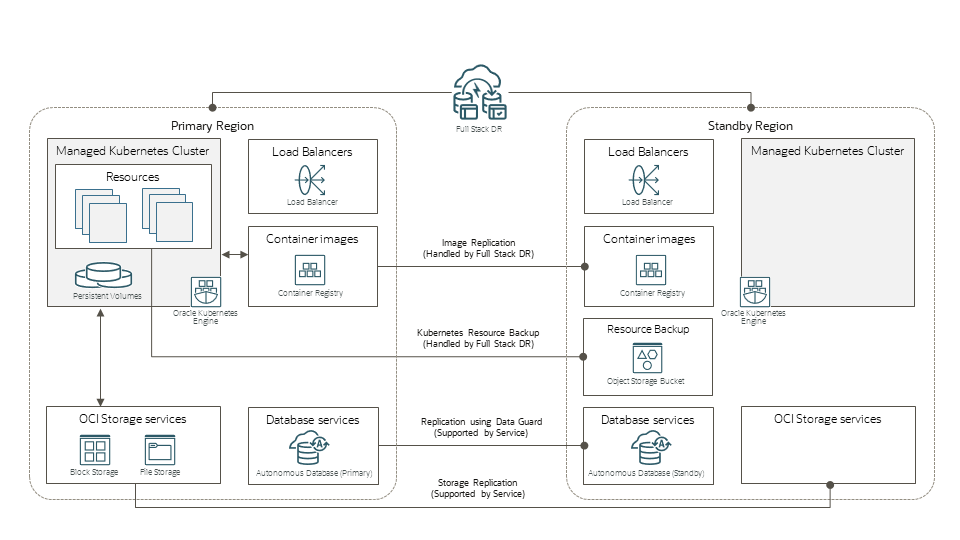
Image Replication for DR
Full Stack DR automatically replicates private OCIR images used by workloads in the primary OKE cluster:
Only private images can be replicated.
Public Docker Hub or public OCIR images cannot be replicated as part of Full Stack DR.
Users may choose to supply a custom image replication secret stored in OCI Vault instead of the default.
This ensures that all required images exist in the standby region, enabling applications to start smoothly after failover.
Node Pool Scaling During DR
Full Stack DR allows you to define node pool scaling actions, which can automatically adjust the number of nodes during failover or switchover events.
You can scale up or down each node pool based on the expected workload load in the standby region.
Instance Jump Host (API Access Instance)
Full Stack DR requires access to the OKE cluster’s API endpoint to execute backup or recovery tasks.
You can specify an existing Instance Jump Host, which must have network access to the cluster's public or private API endpoint.
If you do not provide an instance, Full Stack DR will automatically create an ephemeral Container Instance to handle API operations.
Using a dedicated jump host is recommended for stable and controlled access.
This ensures consistent connectivity during DR operations, especially in private or restricted networks.
Load Balancer Mapping
If your workloads use the OCI Native Ingress Controller, Full Stack DR requires mapping each primary region Load Balancer with a corresponding Load Balancer in the standby region.
This establishes consistent routing in the restored environment and ensures services remain accessible post-failover.
Vault Mapping for Secrets
If your applications store Kubernetes secrets in OCI Vault, Full Stack DR supports:
Mapping primary-region vaults to standby-region vaults
Enabling vault replication
Or manually copying secrets to the standby vault
This keeps all secret data synchronized so restored applications function without manual fixes.
Namespace Backup Policies
You have flexible options for selecting namespaces during backup:
Include all namespaces
Include specific namespaces
Exclude selected namespaces
A maximum of 32 namespaces can be selected for fine-grained control.
Conclusion
Oracle Full Stack DR for OKE provides a comprehensive, container-driven approach to Kubernetes disaster recovery. By leveraging Container Instances, Object Storage, image replication, load balancer mapping, and vault replication, it ensures a smooth and predictable failover process.
From scheduled backups to automated scaling and image synchronization, Full Stack DR eliminates complexity and helps organizations maintain business continuity with confidence.


